
Fleet management, dispatch, and transportation operations — unified in one platform.
Optimize routes. Track vehicles in real time. Manage driver assignments. Schedule maintenance. Automate workflows. Run your entire transport operation from a flexible platform built for control, customization, and scale.
7-day free trial · No per-driver pricing · Self-hosted or cloud deployment
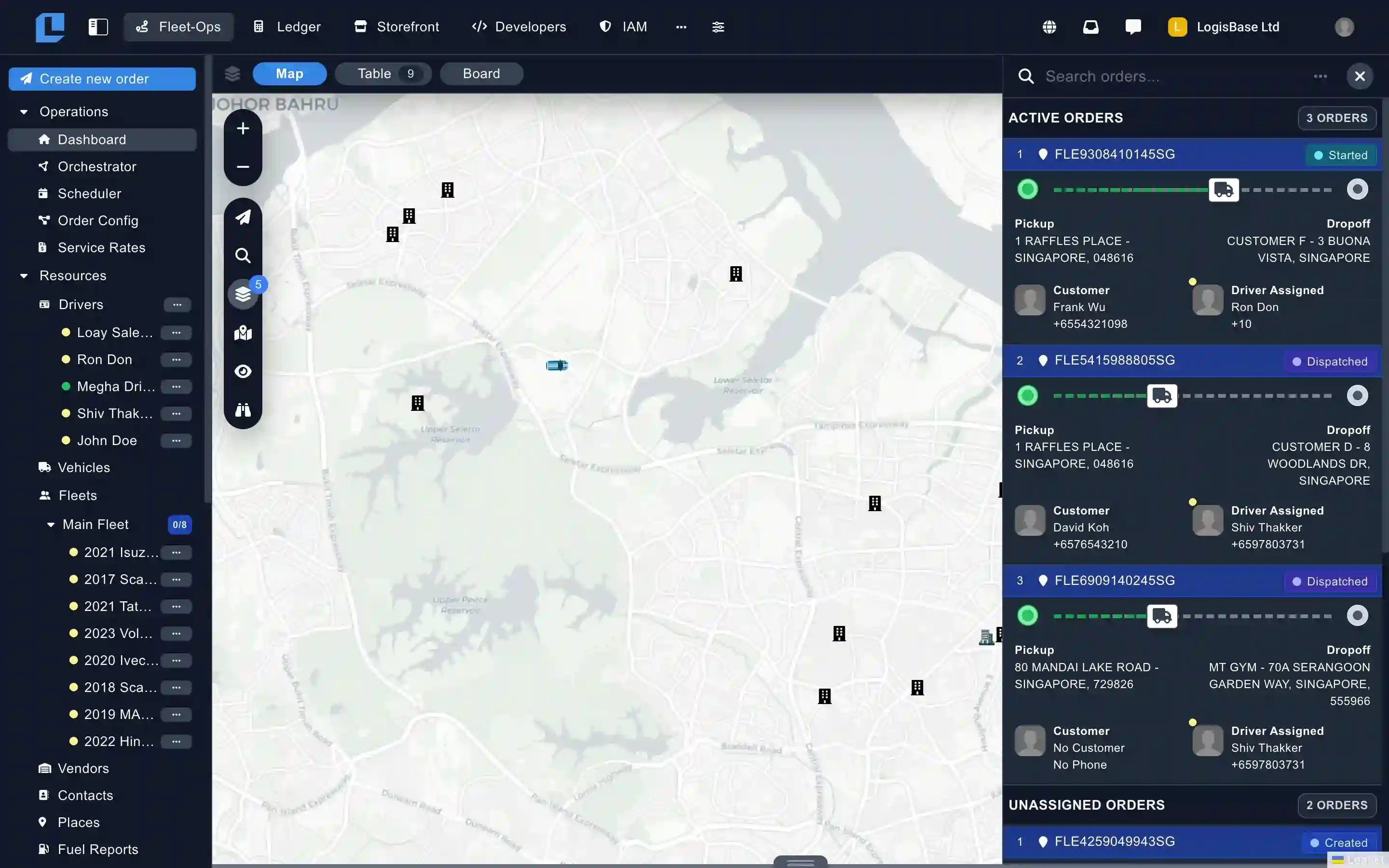
Five core modules. One open platform.
Fleet-Ops is organized into five purpose-built modules — each covering a distinct domain of fleet operations. Use them all from day one, or expand into new modules as your operation grows. Click a module to explore.
Operations
The dispatch command center. Phase-based orchestration, scheduling, order configuration, and service rates — everything that turns an incoming order into a completed delivery.
- Orchestrator Workbench
- Scheduler
- Order Configuration
- Service Rates
From the first order placed to the final vehicle service record.
Build any workflow — without writing code.
Custom order types, drag-and-drop activity flows, business rules, and the exact data fields your operation needs. Adapt the software to your operation, not the other way around.
More on configurationOrder configuration
Design custom order types with configurable fields, drag-and-drop activity flows, and business rules — in one place.
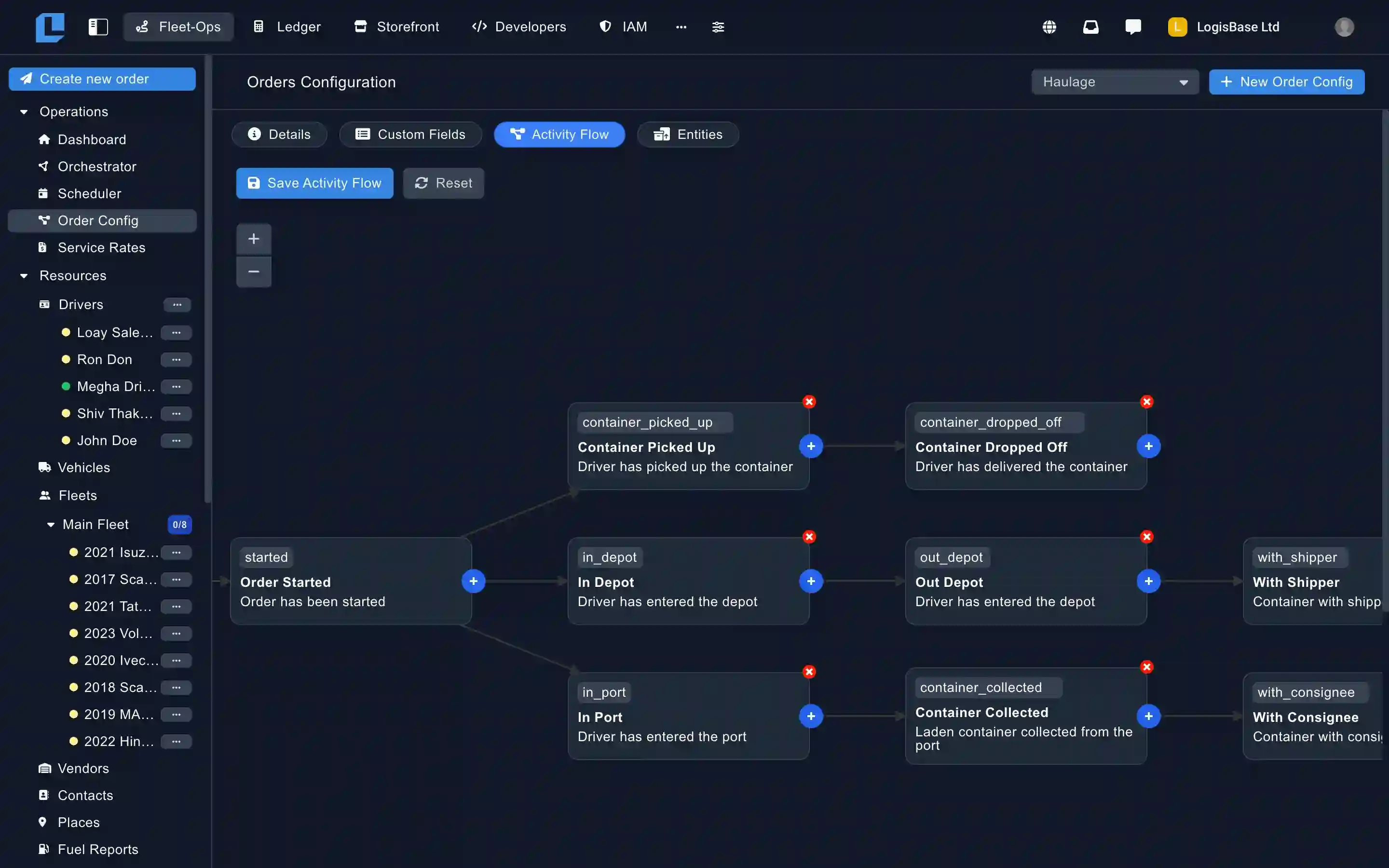
Activity flows
Drag-and-drop designer
Sketch the exact lifecycle each order should follow — statuses, automation triggers, and validation rules.
Custom fields
Any data type, anywhere
Text, select, file, signature, photo, barcode. Attach to orders, vehicles, drivers, or places.
A real-time operations hub every dispatcher can manage from one place.
Kanban, table, or live-map views of every active order. Schedule deliveries ahead of time, plan capacity by zone or driver, and send dispatches to the Navigator app in seconds.
More on operationsLive order queue
Switch between kanban, table, and live-map. Filter by status, driver, zone, or any custom field — act on what needs attention.
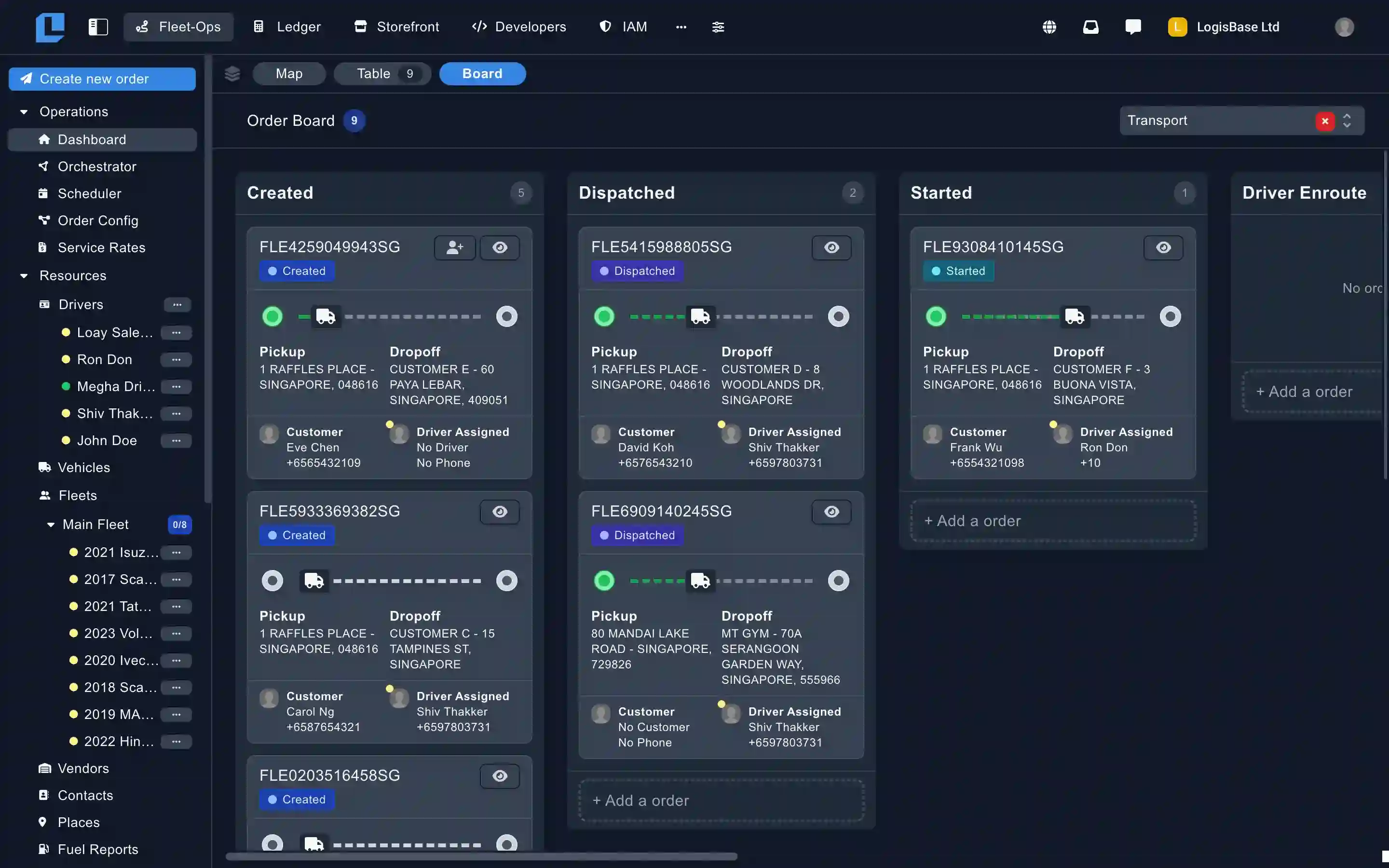
Scheduler
Plan ahead, dispatch later
Organize orders by date, assign delivery windows, and give dispatchers a clear forward-looking schedule to plan, coordinate, and execute operations efficiently.
Service rates
Pricing that matches your business
Distance, weight, zone, vehicle type — any combination. Attached to order types, calculated at dispatch.
Every driver, vehicle, and order — on one live map.
Real-time GPS tracking through the Navigator app. Automated status updates powered by geofencing. Branded customer tracking pages with live ETAs. Seamless connectivity with leading telematics providers.
More on trackingLive tracking & geofences
Real-time vehicle positions, journey replay, and geofence-triggered automation. No phone calls required.
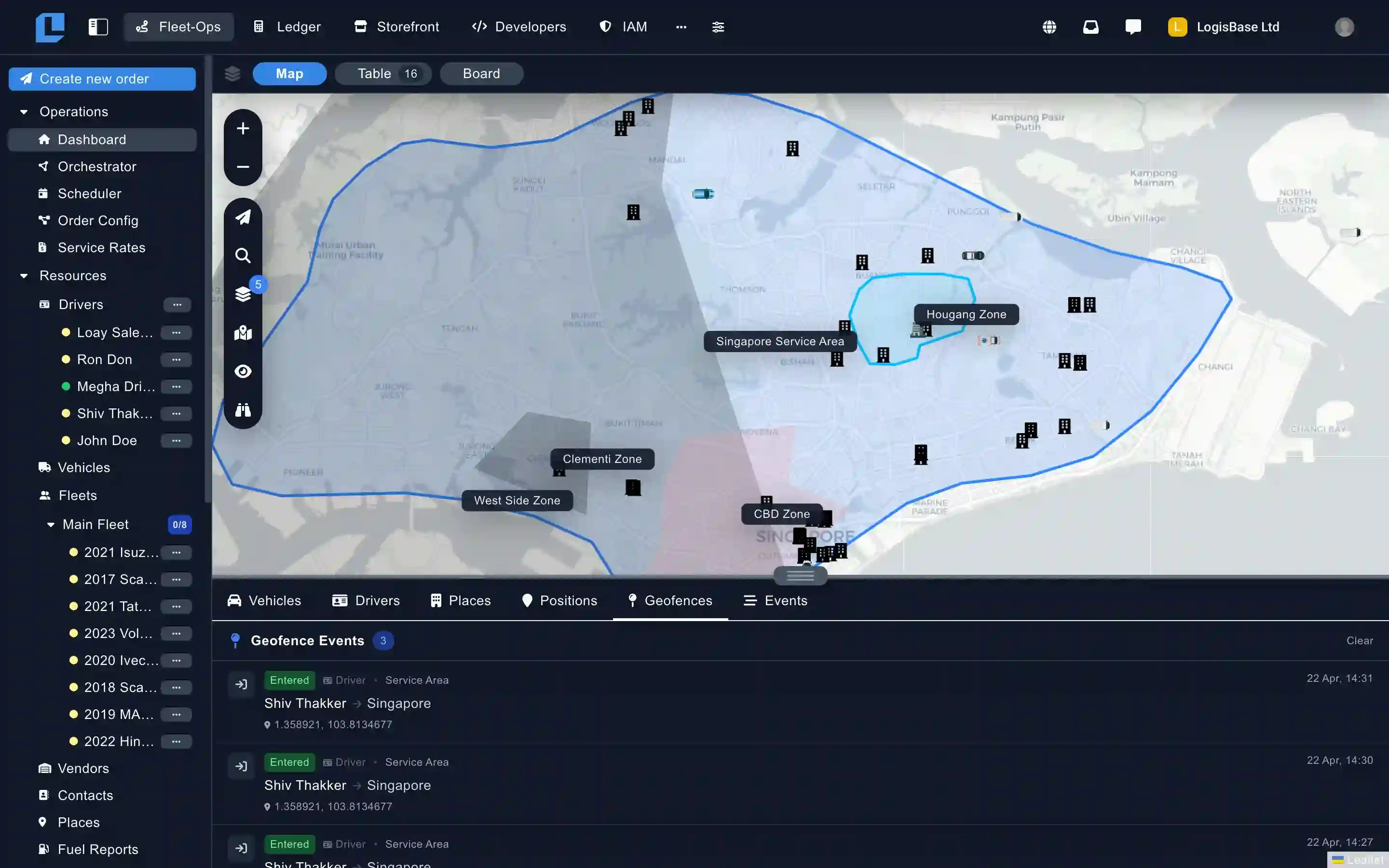
Telematics integrations
Samsara · Geotab · Flespi
Connected providers stream live vehicle data straight into Fleet-Ops. No middleware, no glue code.
Customer tracking
Branded live-ETA links
Customers see real-time driver position and a live ETA. Custom branding, no third-party app.
Keep every vehicle roadworthy.
Work orders from open to resolved, preventive schedules by mileage or engine hours, parts inventory linked to jobs, and driver fault reporting from the Navigator app — all on the same fleet data as dispatch.
More on maintenancePreventive schedules
Service intervals by mileage, engine hours, or calendar date. Alerts fire before vehicles go overdue.
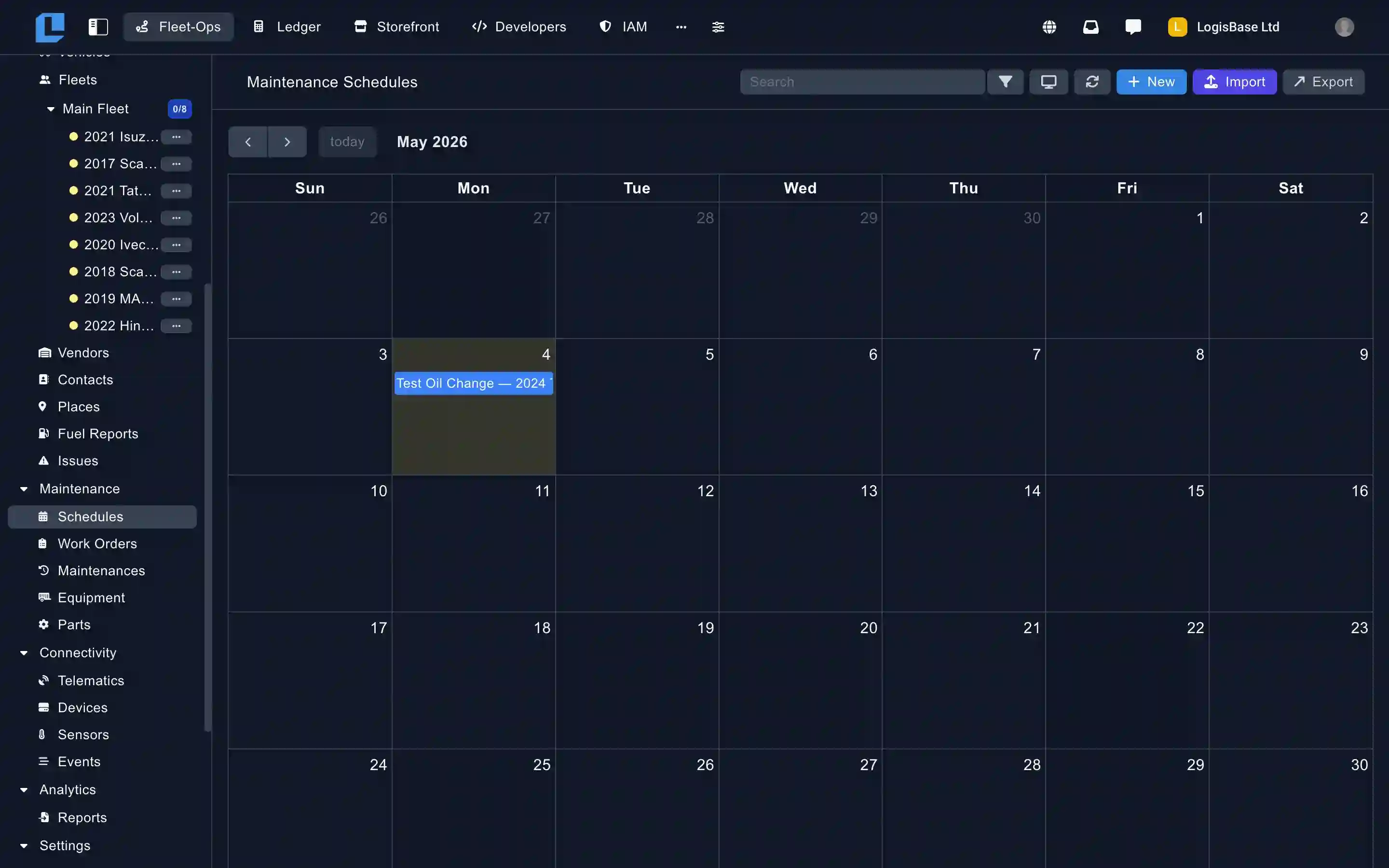
Work orders
From open to resolved
Track every job. Attach parts, labor, costs. Surface high-cost assets that need attention.
Parts inventory
Stock linked to work orders
Track stock levels, link parts consumption to specific jobs. Compliance, resale, insurance-ready audit trail.
The Orchestrator Workbench.
Phase-based optimization. Stack driver allocation, vehicle matching, and route optimization into a reviewable pipeline — or run it hands-free on every incoming order. This is what makes Fleet-Ops different from every other TMS.
More on the orchestratorOrchestrator Workbench
Stack optimization phases — driver allocation by skills, vehicle matching by payload, and route optimization — into a pipeline that produces a visual plan for review.
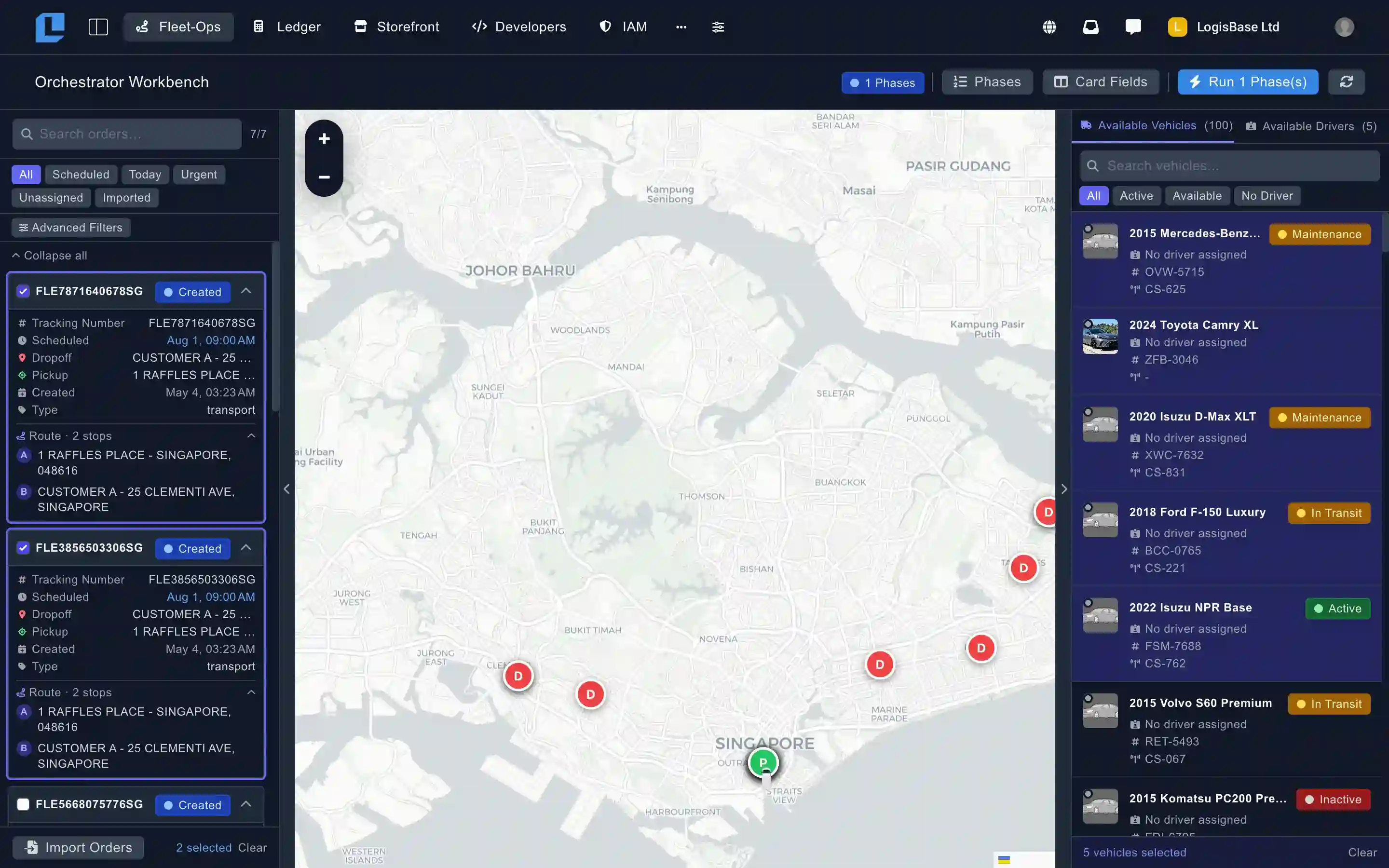
Hands-free mode
Automate the entire pipeline
Configure phases once in Settings. Every incoming order runs through them automatically — no dispatcher needed.
Analytics that loops back
Reports inform the next plan
On-time rate, route efficiency, driver scorecards. Surface inefficiencies before they become problems.


Build and automate with Fleet-Ops.
Every order, driver, and event in Fleet-Ops is reachable via REST. Webhooks fire on every state change. WebSocket channels stream live updates straight into your own product. Wire Fleet-Ops into the stack you already run.
1import LogisBase from '@logisbase/sdk';
2
3const logisbase = new LogisBase('YOUR_API_KEY');
4
5// Create and auto-dispatch an order
6const order = await logisbase.orders.create({
7  payload: {
8    pickup: '123 Warehouse Rd, Sydney',
9    dropoff: '456 Customer St, Melbourne',
10    scheduled_at: new Date(),
11  },
12  dispatch: true,
13});
14
15console.log(`Order: ${order.id}`);
16console.log(`Driver: ${order.driver.name}`);
17console.log(`ETA: ${order.eta}`);
REST API
Full CRUD over the platform
Every resource — orders, drivers, vehicles, places, fleets — addressable via REST. Comprehensive docs and a first-class JavaScript SDK.
Webhooks
Events delivered to your endpoints
Subscribe to order, driver, vehicle, and fleet events. Signed payloads, retries, dead-letter queue, and a live test console.
WebSockets
Real-time streams into your product
SocketCluster channels stream live positions and order state changes. Embed real-time tracking into your own UI, no polling required.
How Fleet-Ops compares.
Most last-mile and dispatch solutions are built around proprietary SaaS models with pricing tied to every driver. Fleet-Ops offers a more flexible approach — designed for deployment control, operational ownership, and scalable resource-based pricing. Here’s how we compare across the features that matter most.
| Capability | Fleet-Ops | Onfleet | Bringg | Spoke | Tookan | Detrack |
|---|---|---|---|---|---|---|
| Core dispatch & tracking | ||||||
| Live GPS tracking | ||||||
| Customer tracking links | ||||||
| Driver mobile app | ||||||
| Multi-stop route optimization | ||||||
| Proof of delivery | ||||||
| REST API + Webhooks | ||||||
| Advanced operations | ||||||
| Phase-based orchestration | Partial | |||||
| WebSocket / live event streams | ||||||
| Native telematics integrations | Partial | Partial | ||||
| Configurable order types & activity flows | Partial | Partial | Partial | |||
| Integrated maintenance module | ||||||
| Platform & ownership | ||||||
| Source-accessible | ||||||
| Self-host option | Enterprise on-prem | |||||
| White-label option | Enterprise | Enterprise | Add-on | |||
| Extensible | API only | Partial | API + integrations | API only | API only | |
| Pricing | ||||||
| Pricing model | Resource-unit | Per-driver | Per-driver | Per-driver | Per-driver | Per-vehicle |
Comparison reflects publicly documented features at time of writing. Competitor information sourced from each vendor's public documentation and pricing pages. Trademarks belong to their respective owners.
Built for every fleet operation.
Frequently asked questions
Stop paying per driver. Start owning your stack.
Join 8,000+ logistics operations running on LogisBase. Source-accessible, no per-seat fees, deploy on your own infrastructure or in the cloud.
7-day trial · Deploy self-hosted or cloud · Full platform access